Night Camera Mode: Video Photo
- 4.6
- Rating
- 1.00M
- Installs
- Free
- Price
 Analysis by App-foxy
Night photography is one of those jobs where a phone can look impressive on the screen and disappointing the moment you check the saved image. Night Camera Mode: Video Photo takes a focused approach to that problem: it is a free photography app from SABAN built around making dark scenes easier to capture. After using it as a dedicated night camera rather than treating it like a full replacement for every camera tool on my phone, I found its appeal quite clear. It is most useful when the ordinary camera produces a dim, muddy frame and I want a more deliberate way to photograph the scene.
The app is available for Everyone and runs on devices using Android 9 or later. It has reached over a million installs and holds a 4.6 average from roughly twelve thousand ratings, which gives it a substantial user base for a focused camera utility. Its current version is 1.2.8, and it was released on June 21, 2023. Those details matter less than the way it fits into an actual evening workflow, but they do show that this is not an obscure experiment I would hesitate to try.
What the night-focused camera actually changes
The central capability is simple to understand: the app is intended to help the phone produce more usable pictures in low light. That does not turn a small phone sensor into a professional camera, and it cannot remove every physical limitation of night photography. What it can do is give the dark scene a camera interface designed around the moment when the regular camera struggles.
You May Also Like

 Blood Strike: 2.5 Anniversary
Blood Strike’s Loadouts Turn Every Drop Into a Tactical Gamble
A close look at Blood Strike’s custom loadouts: how fast access to signature weapons reshapes its battle royale rhythm, rewards preparation, and narrows the gap between fights.

 Pandora - Music & Podcasts
Pandora’s Music Is Easy to Start, but Harder to Recover
Pandora’s strength is its low-effort path from a seed to a station. Its weak spot is how much confidence it asks you to place in connection, setup, and quiet recovery.

 8 Ball Pool
 Is Built on Rivalries, Rematches, and Routine
A close look at the rivalries, rematches, shared routines, and unanswered safety questions that turn a quick pool match into a persistent mobile community.

 Samsung Music
’s Quiet Strength Is Playing What You Already Own
Its reach comes less from spectacle than from dependable access to a personal library. That simplicity is both the app’s strongest retention engine and its ceiling.

 AccuWeather: Weather Radar
AccuWeather Review: A Quick, Clear Forecast for Everyday Decisions
For everyday plans, the best forecast is the one you can understand quickly. AccuWeather makes rain timing, radar, and local conditions easy to act on, with a few trade-offs.

 Hill Climb Racing
Why Hill Climb Racing Still Turns Crashes Into One More Run
A tiny car, a bumpy hill and one more upgrade: Hill Climb Racing keeps resurfacing because its simple chaos makes every near-miss feel personal.
More From Our News Desk



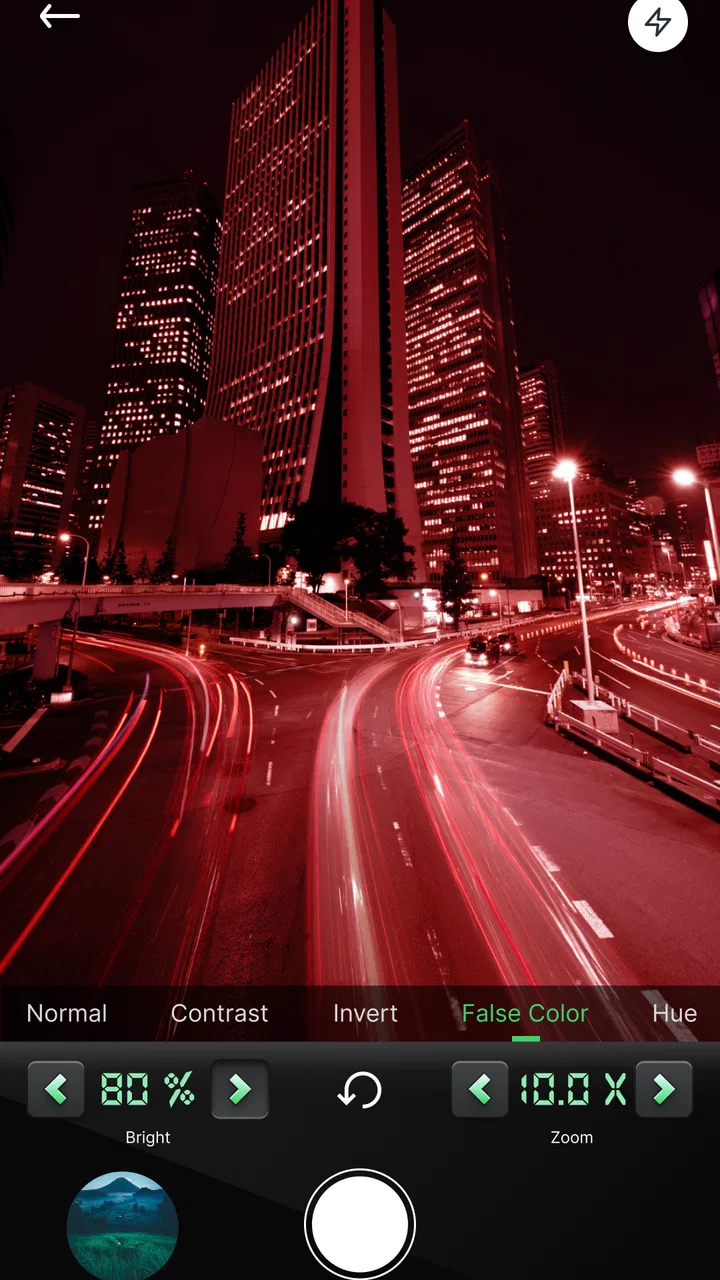
In my experience, the benefit is easiest to notice in scenes with enough fixed structure to work with: a lit street, a building exterior, a quiet park with lamps, or a room illuminated by a few practical lights. These situations contain contrast and detail, but not always enough brightness for a basic camera view to look satisfying. A night-oriented app makes more sense there than it does in complete darkness, where there simply may not be enough visible information to recover.
The important distinction is between brightening a preview and creating a genuinely useful photograph. A screen that looks lighter is not automatically a sharper image. I judge this app by whether the final frame preserves recognizable edges, readable shapes, and a believable balance between shadows and highlights. That is also why I would not expect identical results from every phone. Camera hardware, lens quality, stabilization, and the amount of available light still influence the result.
There is a practical psychological advantage too. When the standard camera preview is nearly black, I tend to point, tap, and accept whatever appears. A dedicated night tool encourages me to slow down, check the composition, and decide whether the subject is still realistic for a handheld shot. That change in behavior can be as valuable as the software itself.
Using it without fighting the scene
I get the best results when I treat the phone as a small camera that needs support. Before pressing the shutter, I lean against a wall, hold the device with both hands, or rest it on a stable surface. This is not a minor tip. In low light, tiny movements become much more visible, so a steadier phone usually improves the image more reliably than repeatedly tapping the screen and hoping for a better frame.
I also avoid judging the shot from the live preview alone. Night scenes can look attractive because bright lamps and signs draw the eye, while darker areas quietly lose detail. After taking a picture, I inspect the saved result at a larger size and check three areas: the brightest light, the main subject, and the darkest corner. If one of those areas is unusable, I change position or simplify the composition instead of assuming another identical shot will fix it.
A useful workflow is to take several versions from slightly different angles. Moving a step to the side can place a lamp behind the subject rather than directly in the lens path. It can also reduce the amount of empty black space in the frame. This is particularly helpful with Night Camera Mode: Video Photo because the app’s value depends heavily on the scene giving it something workable to capture.
I would not use it as a substitute for a flashlight when the subject is completely unlit. A flashlight may create harsh shadows, but it supplies actual illumination. The app is better suited to improving a scene that already has some ambient or artificial light. That distinction prevents a common disappointment: expecting night mode to reveal details that were never visible to the phone in the first place.
A realistic evening use case
Imagine leaving a café after sunset and wanting a picture of the street outside. The regular camera shows the shop window as a bright rectangle, while the pavement and nearby buildings become a dark mass. With this app, I would first move away from the window so the bright area does not dominate the frame. I would brace the phone against a post or hold it firmly at chest height, compose with one obvious subject, and capture more than one version.
The goal would not be to make the street look like daytime. A convincing night photograph should retain darkness. I would look for a balance in which the illuminated storefront, street markings, and silhouettes remain visible without turning every shadow gray. If the result still looks flat, I would change the viewpoint rather than endlessly increasing brightness. A light source at an angle often gives a better sense of depth than a straight-on view.
This same approach works for travel memories, evening architecture, outdoor events, and family moments near a well-lit venue. It is less suitable for a fast-moving subject crossing a dark scene. A person walking quickly, a passing vehicle, or an active pet can become difficult to capture cleanly because low-light photography leaves less room for error. In those cases, a normal camera with a faster capture response may produce a more natural moment, even if the image is darker.
For video, I would keep expectations especially measured. A night-focused camera can make a dark view easier to see, but movement, hand shake, and changing light are harder problems than a single still frame. I would use the app for short, intentional clips in a stable position rather than expecting smooth results while walking through a poorly lit area. The more the camera moves, the more obvious the compromises become.
Where it fits beside the usual camera
The camera already installed on a phone remains the better first choice for many situations. It usually integrates more naturally with the gallery, switching between lenses, quick sharing, and familiar capture controls. If the built-in camera on your device already handles night scenes well, adding another app may not change your results enough to justify the extra step.
Night Camera Mode: Video Photo becomes more interesting when the standard camera leaves you with consistently dark or uneven images. Instead of replacing the default camera everywhere, I see it as a second opinion. I open it when the lighting is the main problem, compare the framing, and keep whichever result looks more honest and useful.
It also occupies a different position from a full manual camera app. Manual tools can be excellent for photographers who want direct control over exposure and focus, but they can make a spontaneous night shot feel like a technical task. This app’s focused purpose is easier to approach. The trade-off is that a simpler experience may not satisfy someone who wants to tune every setting or build a carefully repeatable camera setup.
Editing apps are different again. They can lift shadows after the photograph is taken, but editing cannot fully restore detail that was never recorded. I prefer to capture the strongest original frame possible and then make only modest adjustments afterward. If the source image has blurred edges or clipped lights, a filter may change its mood without truly repairing it.
The trade-offs I noticed in low light
The first limitation is unavoidable: brighter-looking imagery can expose noise. Dark areas may show grain or color speckles, especially on phones with modest camera hardware. That does not make the app useless, but it means I would rather have a slightly darker, stable image than an aggressively bright frame with distracting texture everywhere.
Another trade-off is the tension between brightness and motion. A scene may look better when the phone has more time to gather light, yet that same situation makes movement more damaging. I therefore avoid using the app while walking unless the subject is unimportant and the clip is purely atmospheric. For a posed person or building, stability is worth prioritizing.
Bright lamps can also remain difficult. Night photography is not only about lifting shadows; it is about controlling the difference between a light source and everything around it. I often reframe so that a lamp is near the edge rather than in the center, and I avoid pointing directly at the most intense light when the surrounding subject matters more.
There is a workflow cost as well. A dedicated camera app means one more place to begin a photo, one more interface to learn, and potentially another set of captured images to sort through. For someone who takes occasional snapshots and is happy with the default camera, that friction may outweigh the benefit. I think the app earns its place when night photography is a recurring problem, not merely a once-a-year curiosity.
I would also be cautious about judging it from one dramatic before-and-after image. Results depend on the phone, the scene, the amount of light, and how steadily the device is held. A fair test is to photograph the same subject with the regular camera and this app from the same position, then compare details in the shadows and around bright lights. That gives a much more useful answer than relying on the preview or on a particularly favorable scene.
Who gets the most from it
This app is a good fit for people who regularly photograph after sunset and want a straightforward alternative when their built-in camera produces disappointing darkness. It is also suitable for users who do not want to learn a complicated manual interface but are willing to slow down and make stable compositions. The Everyone content rating makes it approachable for a broad audience, while Android 9 compatibility covers many still-common devices.
I would recommend it especially to someone who photographs buildings, streets, signs, landscapes, and other subjects that stay still. These subjects give the night-focused approach time to show its value. A person who enjoys experimenting with viewpoints will probably get more from it than someone who expects one tap to solve every lighting problem.
I would skip it if your main goal is fast action photography, polished professional controls, or effortless integration with a phone’s entire camera system. It is also not the right answer for scenes with almost no light at all. In those cases, adding a light source, using a tripod, or choosing a phone with stronger built-in night processing would be a more sensible upgrade.
The app is free, which makes testing that decision easy. I would install it, photograph a familiar outdoor subject at night, and compare the result with the default camera before committing to it as part of my routine. The useful question is not whether it makes every picture bright, but whether it gives me a better balance of visible detail, atmosphere, and stability on my particular phone.
My final take after using it as a second camera
Night Camera Mode: Video Photo succeeds when its role stays focused. I would not describe it as a universal camera replacement, and I would not expect software to overcome a moving subject, a shaking hand, or complete darkness. Its strength is giving low-light photography a dedicated place in my workflow, especially when the default camera makes an evening scene look flatter and darker than it felt in person.
What I appreciate most is the way it encourages a more careful process: find available light, steady the phone, simplify the frame, and inspect the saved image rather than trusting a bright preview. That approach produces better decisions and makes the app’s limitations easier to manage. With a 4.6 average and more than a million installs, it is clearly appealing to many Android users, but the final test is still personal because night results vary so much by device.
My recommendation is straightforward: try it if dark scenes are a regular weakness of your phone’s normal camera. Use it for stable subjects, compare results honestly, and keep the default camera available for speed and movement. For the right user, it is a practical low-light companion rather than a magic night-vision tool.
FAQs for Night Camera Mode: Video Photo
01What is Night Camera Mode: Video Photo, and how does it work?
Night Camera Mode: Video Photo is an app designed to enhance your device's camera capabilities for low-light conditions. It uses advanced algorithms to improve the clarity and brightness of both photos and videos taken at night or in dimly lit environments. The app achieves this through noise reduction, exposure enhancement, and other proprietary techniques to deliver better night photography results.
02Is Night Camera Mode: Video Photo compatible with all devices?
While Night Camera Mode: Video Photo is designed to work on most Android and iOS devices, performance may vary depending on your phone’s camera specifications and processing power. It’s recommended to check the app’s compatibility with your specific device model on the respective app stores before downloading to ensure optimal functionality and performance.
03Does using Night Camera Mode: Video Photo drain the battery quickly?
The app does utilize additional processing power to enhance night-time images and videos, which may lead to increased battery consumption during use. However, it is optimized to balance performance and battery life. To manage battery usage, it's advisable to use the app for short periods and ensure your device is adequately charged when planning extensive nighttime photography sessions.
04Are there any in-app purchases or subscriptions in Night Camera Mode: Video Photo?
Night Camera Mode: Video Photo may offer in-app purchases or subscription options to unlock advanced features or remove ads. The basic features are typically free, but if you enjoy the app and find value in its premium offerings, you might consider upgrading. Always check the app store listing for detailed pricing information and to understand what features are included in the free version versus the paid options.
05How does Night Camera Mode: Video Photo compare to native camera night modes?
Night Camera Mode: Video Photo often provides more customizable options and enhanced features compared to the native night modes available on some smartphones. While native modes are optimized for specific devices, this app aims to offer a universal solution with additional settings for exposure, ISO, and noise reduction, potentially providing superior results on devices lacking advanced built-in night modes.
Pros
- Exceptional low-light performance.
- User-friendly interface.
- Supports high-resolution photos.
- Real-time filters available.
- Minimal battery consumption.
Cons
- Limited editing tools.
- Occasional app crashes.
- Ads can be intrusive.
- Requires internet for updates.
- No manual ISO adjustments.

Night Camera Mode: Video Photo
Gallery